
Description
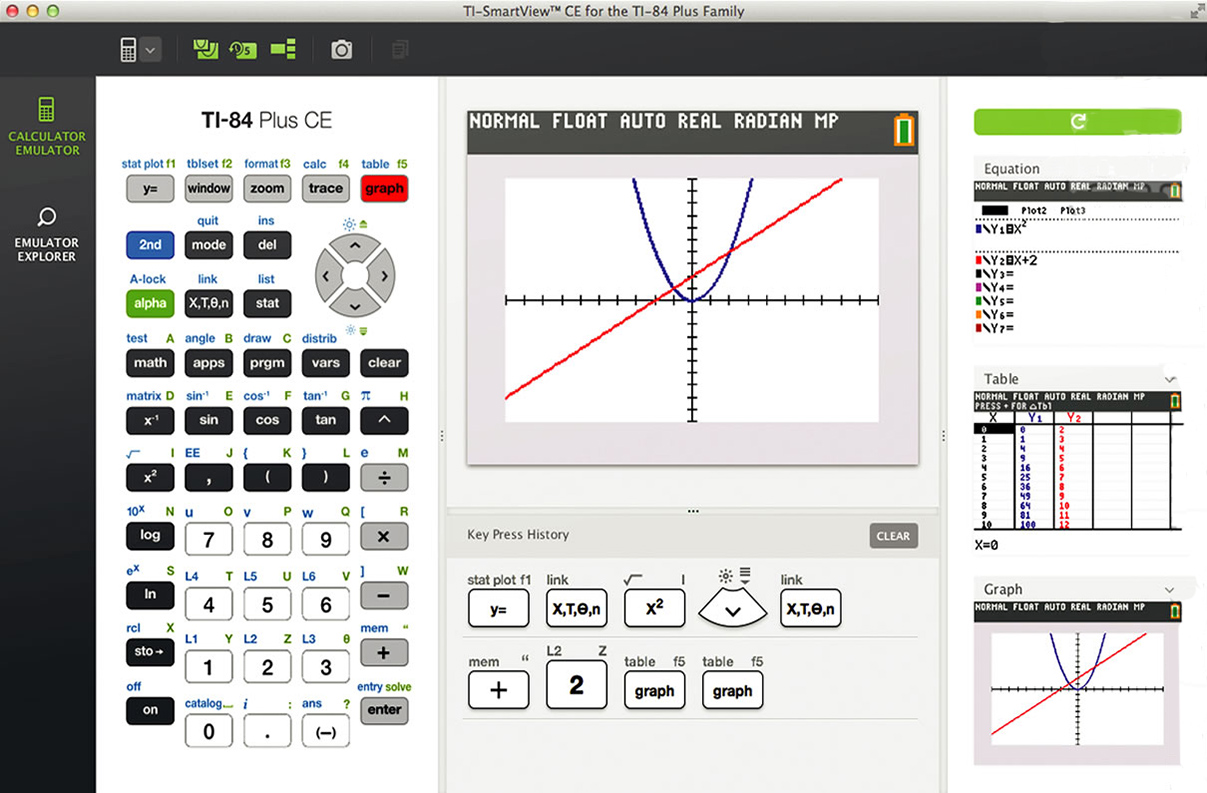
TI-SmartView for TI-84 emulator software for Windows and Macintosh is an easy-to-use, effective demonstration tool for leading the classroom exploration of math and science concepts. Based on the functionality of the popular TI-84 family of graphing calculators (and compatible with the TI-83 Plus family), the TI-SmartView compliments classroom calculator use by projecting an interactive representation of the calculator, plus offers many unique instructional capabilities.
Licensed for two installations for one user.
- Highly interactive computer emulation of TI-84 family graphing calculators (compatible with TI-83 Plus family).
- Helps increase student understanding of concepts by showing multiple, simultaneous representations of graph, table, and equation screens (as recommended in the NCTM Standards).
- Increases teacher familiarity and comfort with graphing calculator functionality through preloaded demos (scripts) from TI.
- Provides a clear and easy way for students to follow along by graphically displaying key press sequences.
- Easily integrates with existing projection systems and interactive whiteboards for viewing by the entire class.
- “Always on top” feature for use with whiteboards.
- Freely resizeable application window.
- Key Press history on large screen view.
- Contrast options for visually impaired.
- Windows and Macintosh.
Software is not returnable once activated.
More Info
Related products
-

SmartView For MathPrint TI-30XS/34MV Single User
$79.90 Request Quote -
SmartView for TI-84 CE 1-year subscription, Volume, 10-14 licenses
$26.89 Request Quote -
TI-Nspire CX Student Software, Volume Perpetual (min 10)
$37.49 Request Quote -

TI-Nspire Premium Teacher’s Software Volume License (min 5)
$71.89 Request Quote